Tide Pass · Now on iPhone and Android

    Your business, in every customer’s pocket

    Tide Pass is the free app for everyone who books with you. They book in a few taps, walk up and check in, sign your waiver, cancel inside your policy and message your front desk. Members get their card, their member price and their plan too. There is nothing for you to build.

    Email us
    Download on the App StoreGet it on Google Play
    Price for your customers
    Free
    Automatic reminders per booking
    2
    Passwords for anyone to forget
    0

    Narrated tour

    Watch it in two minutes

    The real app on a phone, with a voice walking through it while it taps: the home screen, booking with a member price, a tour, Walk up now, the member card, their plan and chat. No sign-up, nothing to install.

    • Their home screen
    • Book in the app
    • Members book free
    • Tours and member prices
    • Walk up now
    • The member card
    • Their own plan
    • Chat with you
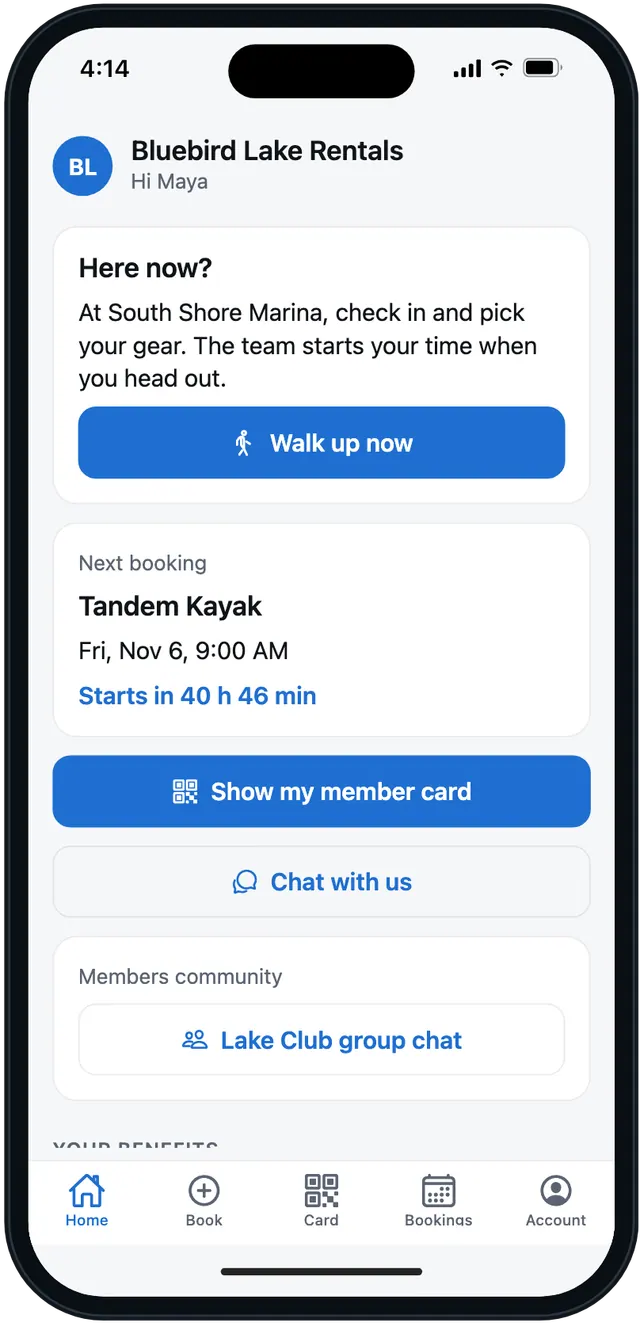
    Tide Pass on a phone: Walk up now, the next booking and the member card

    For everyone who books with you

    From first booking to back on the dock

    Tide Pass is not only for members. Anyone who has booked with you or signed your waiver signs in, and the app does the jobs your front desk answers the phone for.

    Book without the back and forth

    Everything they can book at each of your locations, with the next free times and their price. They pick the day, the length, the start, who is coming by your own guest types, the unit, add-ons and tour tickets in the app. When there is something to pay, your checkout opens with all of it already chosen.

    Walk up and check in

    At a location with the Walk-Up Hub on, a Here now? card checks they are on site, shows your fleet with live counts, and puts their party on your hub board without a stop at the counter.

    Their waiver, sorted

    The app shows whether their waiver is valid and until when, and they sign your own waiver right there, filed under their name.

    Cancel on their own

    Each booking shows your cancellation window and what comes back, refund or store credit, by your policy. Past the window, it says why and offers a chat with you instead.

    Reminders that bring them back

    A notification the day before and two hours before every booking, automatically, plus updates when a booking changes. No sequence to build.

    A line straight to you

    Chat with us drops their message into your inbox, next to your website chat and texts. Only your team answers it, never the AI, and your reply reaches them as a notification.

    Booking

    Every choice made in the app

    The same availability and prices as your booking page, with your own guest types, units and add-ons. Members see exactly what their membership covered. Checkout opens only when there is something to pay, already filled in.

    Walk up

    Here now? Check in from the dock

    The app confirms they are on site, shows what is free right now, and puts their party on your Walk-Up Hub at Check-in once their waiver is current. Your team starts the time.

    On the water

    Know who is out, and who is coming back

    Turn it on for a location and a party that checked in with Tide Pass shows up on your hub as they leave the dock and as they come back.

    • Left the dock, Returning

      Each party's hub card says when they leave the dock and when they come back to it, and staff get an alert as they return so someone meets them.

    • A live map of your guests

      A strip above the hub board counts who is out and opens a map with the dock, every app guest and their trail.

    • Start the clock at check-in

      Choose whether an app check-in lands at Checked in or On water, where the time starts straight away.

    Off by default. The phone shares its position only while the party is out, and only with their permission.

    For your members

    Everything their membership does, one tap away

    A membership people use is a membership people renew. Members get all of the above, plus the card, the price and the plan.

    A member card your staff can trust

    A QR code that changes every 30 seconds, so a screenshot passed to a friend stops working, and one tap adds it to Apple Wallet. Staff scan it at the front desk.

    Their member price, explained

    Every item shows what it costs them, and the app says what the membership did: "Your session is included", "1 guest free with your guest discount", "Uses 1 credit". Nothing to pay? It books right there.

    Member prices on tour tickets

    Set a ticket price for each tier, instead of a percentage off every trip. Members see it as their Member price when they book.

    Their plan, in their pocket

    What the membership includes and what is left, every receipt, a new plan, and pause or cancel where your tier allows. US members can pay dues from a bank account where you turn it on.

    The whole family

    Family members sign in as themselves and book with the family benefits you set. Let the main member add and remove family from the app, tier by tier.

    Your members' community

    Put your members' WhatsApp group, or any link, in the app. Up to five, each for every tier or some, and only active members see them.

    Benefits they notice

    When a renewal brings their credits and guest passes back, Tide Pass tells them: "Your benefits are ready."

    An announcement a week

    Send members a push from Memberships, once a week, to the ones who switched announcements on. Sent one by mistake? Remove it from their Home screen.

    For you

    A customer app, without building one

    Branded apps usually mean an agency, a developer account and a year of upkeep. Tide Pass is already in your RentalTide account.

    • Nothing to set up

      Anyone who has booked with you, signed your waiver or holds a membership signs in with the email or phone number you already have on file.

    • Get them on it

      Print a QR code for your counter, send the app link by email or text after a signed waiver, and give every new Tide Pass user a welcome offer from one of your promo codes. Each is off until you turn it on.

    • Rewards on their Home screen

      Where you run a loyalty program through RentalTide, their points, tier and recent history show on Home.

    • See who has the app

      A badge on your members list shows who is signed in, and the Member app tab shows how many use it.

    • Every member, at a glance

      Each member's page shows their upcoming bookings, and Book opens a booking with their membership already applied.

    How it works

    Three steps, and none of them are yours

    1. They download Tide Pass

      Free on the App Store and Google Play, one app for every business on RentalTide. Tell them at the desk, on your confirmation page, or in an email.

    2. They sign in with a code

      We send a one-time code to the email or phone number you have on file. Anyone who has booked with you, signed your waiver or holds a membership gets in. No password.

    3. Your business is there

      Book, bookings, waiver and chat for everyone, plus the card and plan for members. A customer of two RentalTide businesses switches between them in the same app.

    Your icon on their home screen

    Members can switch Tide Pass to your business’s own icon, so your brand sits on their home screen. Business icons ship with app releases: ask us to add yours.

    Questions

    Before you tell your customers

    Is it only for members?

    No. Everyone who has booked with you, signed your waiver or holds a membership can sign in. They book, sign waivers, cancel, chat, and walk up and check in where you use the Walk-Up Hub. Members also get their card, their member price, their plan, family, announcements and your community links.

    Can customers pay in the app?

    Payment happens on your own online checkout, the same one as your website. Tide Pass makes every choice in the app, then opens checkout with all of it filled in. A member's booking with nothing to pay, like a session their membership includes, books right in the app.

    Does it cost my customers anything?

    No. Tide Pass is free on the App Store and Google Play.

    Do I have to turn anything on?

    Not for the basics: booking, bookings, waivers, reminders and chat work for everyone, and every membership works with it. The extras are yours to switch on: the counter QR code, the app link after a waiver, a welcome offer and community links in Memberships > Member app, and Walk up at a location with the Walk-Up Hub.

    Does the app track my customers?

    Walk up checks where they are once, when they open it, to confirm they are on site. Following a party on the water is off unless you turn it on for a location, and even then the phone shares its position only while they are out, with their permission.

    Can I send notifications?

    Booking reminders go out by themselves, the day before and two hours before. On top of that you can send members one announcement a week, which reaches those who switched announcements on.

    Can the app wear our logo?

    Tide Pass is one app for every business, and members can switch its home-screen icon to their business's own. Business icons ship with app releases, so ask us and we will add yours.

    What stops a member sharing their card?

    The QR code changes every 30 seconds and is tied to their signed-in phone, so a screenshot or a forwarded photo stops working almost at once. Signing out of the app turns the card off.

    Tide Pass on RentalTide

    Take the booking. We’ll put it in their pocket.

    Online booking, waivers, the Walk-Up Hub and memberships, and now an app your customers will actually open. See everything RentalTide does.

    Email us
    Download on the App StoreGet it on Google Play

    Apple, Apple Wallet, iPhone and App Store are trademarks of Apple Inc. Google Play and the Google Play logo are trademarks of Google LLC. Nothing on this page implies endorsement by, or affiliation with, Apple or Google. The phone, panels and map are illustrations with made-up names, and the QR pattern is decorative. If you believe anything here is inaccurate, tell us at sales@rentaltide.com and we will correct it.